






More and more customers are reaching for their iPhone to pay instead of digging through their wallet for a credit card. For business owners who still don’t know how to accept Apple Pay for your business, this friction can cost real revenue—customers who can’t pay using their preferred method simply walk over to a competitor who accepts it.
In this article, you’ll find everything you need to enable Apple Pay for your business: required hardware, cost breakdowns, and the exact steps to launch.
What Apple Pay is and how it works for businesses
Apple Pay is Apple’s proprietary digital wallet. Instead of pulling out a physical card, customers store their credit or debit cards securely on their iPhone, iPad, or Apple Watch, and complete payments simply by holding their device near your card reader. Transactions process in seconds using Touch ID or Face ID for customer authentication—no additional steps required on your end.
Everything operates via Near Field Communication (NFC) technology: your customer’s iPhone and your payment terminal communicate wirelessly without physical contact. Rather than transmitting actual card numbers, the system relies on tokenization—generating a unique, single-use encrypted code for every transaction. This makes contactless mobile payments significantly more secure than traditional physical cards.
Why are more and more customers paying with Apple Pay?
Over 85% of businesses in the United States now accept contactless payments. If you’re asking what stores accept Apple Pay in the United States, the simple answer is: the vast majority. From restaurants and beauty salons to food trucks and retail boutiques, paying with an iPhone is no longer a novelty—it is a baseline customer expectation.
Millennials and Generation Z currently hold significant purchasing power, and they represent the most active users of Apple Pay. For these consumers, digging for physical cards or cash feels like an unnecessary hassle. If your business doesn’t support their preferred payment method, they rarely make exceptions—they simply move on to a competitor who does.
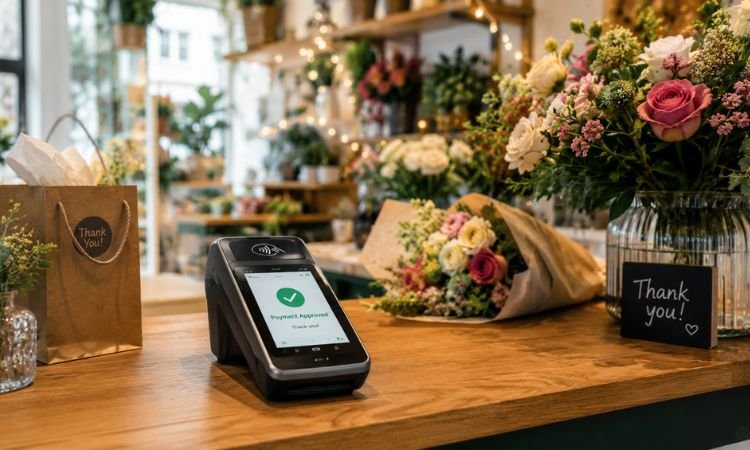
What your business needs to accept Apple Pay
To start using Apple Pay to receive payments at your business, you don’t need to overhaul your entire payment setup. In most cases, all it takes is an NFC-enabled payment terminal, a mobile reader, or configuring payment options directly on your iPhone. There are three primary ways to implement it depending on your operational model:
NFC POS Terminal: The Standard Contactless Checkout
An NFC-enabled countertop terminal is the most common starting point. You set it up at your register, the customer taps their iPhone or Apple Watch against the reader, and the payment clears in seconds. Beyond Apple Pay, these terminals also accept Google Pay, Samsung Pay, and contactless tap-to-pay cards—giving you a single hardware investment that covers all modern digital payment methods.
Tap to Pay on iPhone: Accept Contactless Payments Anywhere
If your business requires taking payments on the go—tableside, at events, or in the field—you can accept contactless payments directly on iPhone without extra hardware. Tap to Pay turns your iPhone into a payment terminal: customers simply tap their device or card against yours to complete the sale. This makes it an ideal solution for food trucks, field services, and pop-up events.
Apple Pay for E-Commerce: Frictionless Online Checkout
If you take orders or payments online, you can integrate Apple Pay straight into your e-commerce checkout workflow. Customers select Apple Pay at checkout, confirm the transaction using Face ID or Touch ID, and complete their purchase without typing out billing addresses or card numbers. Fewer checkout steps directly reduce shopping cart abandonment.
How much does it cost to accept Apple Pay?
Here is the fact that surprises most business owners: Apple charges no direct merchant fees for transactions processed through Apple Pay. Your only cost is your standard payment processor transaction rate—the exact same rate you pay when a customer inserts or swipes a physical credit or debit card. For your accounting, Apple Pay processes just like any standard card transaction.
Through JAMSgroup’s zero-fee dual pricing program, card processing costs are transparently covered by customers paying with card or mobile wallet, while cash buyers receive a small discount. As a result, your business retains 100% of every sale—whether customers pay via Apple Pay, Google Pay, or physical cards—eliminating processing fees and preserving your profit margins.
How to start accepting payments with Apple Pay: a step-by-step guide
Enabling Apple Pay for your business is easier than it sounds. You don’t need to overhaul your entire payment system or be a tech expert—just follow these steps in order:
- Verify your terminal has NFC technology enabled: Most modern payment terminals come with NFC pre-installed. Look for the contactless wave symbol on or near the screen—that indicates your hardware accepts contactless payments. If you aren’t sure, check directly with your payment provider.
- Activate contactless acceptance with your provider: In many cases, contactless capability is turned on by default. For others, your merchant provider simply needs to toggle it on within your merchant account configuration. A quick phone call or message is all it takes to confirm.
- Run a test transaction: Before processing live customer orders, test the terminal using your own iPhone or ask a team member to tap their device. Confirm that the test charge displays correctly in your merchant reporting dashboard.
- Let your customers know you accept Apple Pay: Display official Apple Pay decals near your payment terminal and announce it across your social media channels. It’s a simple detail that customers ready to pay with their iPhone will notice right away.
At JAMS group, we have everything you need to get started today.
If you’ve made it this far, you have everything you need to make an informed decision. The next step is getting your system set up—and that is exactly what we do at JAMSgroup. Here are the processing solutions we bring to your business:
- Countertop NFC Terminals: Certified POS terminals configured to accept Apple Pay, Google Pay, Samsung Pay, and contactless debit and credit cards. Ideal for restaurants, beauty salons, retail stores, and fixed-counter storefronts.
- Wireless Terminals & Mobile Card Readers: Process transactions anywhere without being tied to a fixed register. Perfect for food trucks, field services, or businesses operating across multiple service points simultaneously.
- Tap to Pay on iPhone: Turn your smartphone into a payment terminal. Accept Apple Pay payments directly on your iPhone with zero external hardware needed.
- E-Commerce Payment Gateway: Accept Apple Pay directly on your online store. Customers complete checkout with a single tap from their Apple device—no manual card entry or lengthy billing forms required.
- On-Site Installation, Staff Training, and Bilingual Support: We handle complete system configuration, train your staff on-site, and deliver ongoing support whenever you need it in English and Spanish.
The right payment solution depends on how your business operates. Contact JAMS group today and let our team help you configure the ideal setup.

Request a consultation with an advisor.
Discover how a POS system can help you get paid faster, manage your inventory, and grow your business.