





A customer walks up to your counter, orders what they need, and reaches for their credit card when it’s time to pay. But you only accept cash. The customer apologizes, mentions they don’t have cash on hand, and walks out the door. That sale is gone for good—and so is that customer. If you don’t know how to accept credit card payments in your business yet, this scenario will keep repeating itself as fewer and fewer people carry cash in their wallets.
In this article, we’ll break down exactly what you need, how much it costs, and the step-by-step process how to accept card payments for your business—without the fluff or hidden fine print.
Why does your business lose sales if it doesn't accept card payments ?
Think about how many times a day a customer comes to your business card in hand and without a single bill on them. That is no longer the exception: in the United States, credit card payments and debit transactions have far surpassed cash as the preferred payment method. A customer who cannot pay the way they want won’t wait, won’t return tomorrow with cash, and won’t look for you online later. They simply walk over to the business next door that does accept cards.
And it isn’t just about a lost sale. When a business doesn’t accept card payments, customers perceive something deeper: lack of trust. Displaying Visa, Mastercard, or American Express logos on your counter or front door signals that your establishment is legitimate, secure, and operating professionally. Without them, the unintended message is quite the opposite.
There is also a less visible but equally impactful factor: card-paying customers tend to spend significantly more than cash buyers. Cash spending is strictly limited to physical wallet bills. With credit and debit cards, that spending ceiling is removed. For a restaurant, this often means the difference between a diner ordering just an entree or adding drinks, dessert, and a generous tip.
If your business remains cash-only, you aren’t saving on processing fees. You are paying a much higher price: losing customers who never come back.
What do you need to start accepting card payments ?
Accepting credit card payments doesn’t require setting up a complex banking infrastructure or signing a twenty-page agreement. All you need are three key components: a business bank account to receive your sales payouts, a payment processor that connects your business to major card networks, and hardware or software to capture the customer’s payment. With those three pieces, you’re ready to launch. Each comes with options tailored to different business sizes and industries, detailed below.
POS Terminal Types: Choosing the Right Option for Your Business
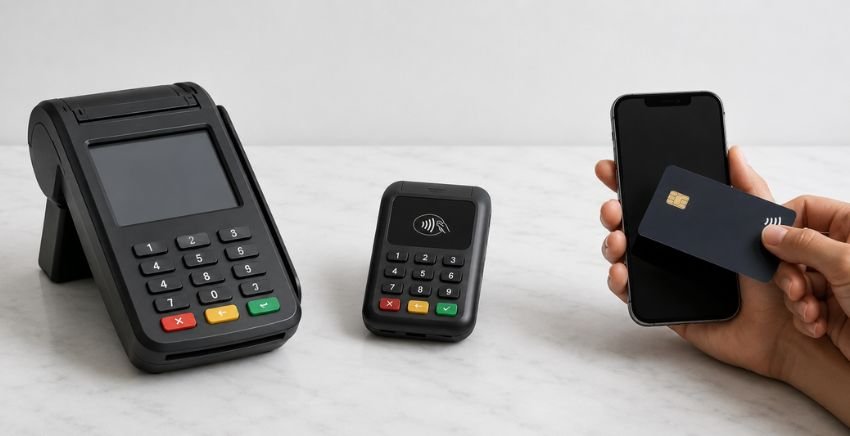
The point of sale terminal is the physical hardware device where customers swipe, insert, or tap their payment cards. There are three primary types, and the right fit depends on how your business operates:
- Countertop Terminal: A fixed device installed at your checkout counter. It accepts EMV chip cards, magnetic stripe swipes, contactless payments (NFC), and digital wallets. This is the standard solution for retail stores, fixed-counter restaurants, and beauty salons.
- Mobile Terminal (mPOS): A portable, battery-powered device connecting via Bluetooth or Wi-Fi. Ideal for accepting payments tableside, on delivery routes, or at pop-up events and trade shows. Take it anywhere with a active internet connection.
- Mobile Card Reader: A compact reader that pairs with your smartphone and dedicated app. It represents the most affordable entry point with minimal upfront hardware costs. If you run a food truck, field service operation, or new startup, this is your ideal starting point.
You don’t need the most expensive hardware. You need the solution that matches how and where you sell.
Payment Processor: What It Is and How It Works
A payment processor is the financial entity that routes money from your customer’s payment card directly into your business bank account. When a customer taps or inserts their card at your terminal, the payment processor instantly communicates with the card-issuing bank, verifies card legitimacy and available funds, approves the transaction, and initiates payout transfer—all within seconds.
Some payment processors require opening a dedicated merchant account where funds are briefly held before transferring to your business bank account. Modern merchant services providers handle this account architecture behind the scenes, streamlining onboarding so you can connect your bank account and start processing quickly.
Key factors when evaluating a payment processor include transaction fees, payout funding timelines, availability of dedicated bilingual customer support, and hardware compatibility with your specific business model.
Ways to accept credit and debit card payments at your business
Not every business collects payments the same way. A sit-down restaurant with a central checkout counter doesn’t have the same operational needs as a plumber billing on-site or an online boutique selling through Instagram. There are three primary ways to accept credit card payments, and you can implement one, two, or all three depending on your sales model.
Countertop Processing with a POS Terminal
This is the most direct payment method. A customer approaches your checkout counter, presents their card at the terminal (via chip, magnetic stripe, or contactless tap), and the payment processes in seconds. The terminal prints or emails a receipt, inventory automatically syncs if enabled, and transaction funds are recorded into your business account.
Countertop processing is ideal for brick-and-mortar operations with a fixed checkout location: retail stores, grocery outlets, beauty salons, counter-service restaurants, and barbershops. If the majority of your revenue happens at a central register, this serves as your processing baseline.
Mobile Card Processing via Smartphone App
If your business lacks a fixed counter or requires accepting payments wherever your client is located, you can turn your smartphone into a fully functional point-of-sale terminal. There are two primary ways to do this:
The first relies on a compact card reader that pairs with your phone over Bluetooth, running on a dedicated credit and debit card processing app. The customer inserts or taps their card on the reader, you confirm the sale amount in the app, and the transaction closes. This setup is ideal for servers taking tableside payments, vendors at trade shows, or service technicians completing jobs in the field.
The second method is even simpler: accepting card payments directly on your smartphone without external hardware using Tap to Pay functionality. The customer simply taps their contactless card or mobile wallet against your smartphone, processing the payment instantly. No extra devices, cables, or separate battery charging required. To see how this setup works in detail, explore our step-by-step guide on accepting Apple Pay for your business.
For food trucks, field contractors, delivery operators, cleaning services, or mobile professionals, smartphone payment processing eliminates the cash-only barrier completely.
Online Payment Gateways for E-Commerce and Invoicing
If you sell products or services online—whether through an e-commerce website, social media channels, or digital invoicing via WhatsApp and email—you need a secure payment gateway. A payment gateway acts as an online checkout counter, enabling customers to securely enter card details on an encrypted checkout page without exposing sensitive financial data.
Setting up an online gateway does not require custom web development. Most modern e-commerce platforms feature turn-key payment gateway integrations. For social sellers and service providers, you can generate direct payment links and send them straight to a client’s mobile phone. Reducing friction during payment checkout directly decreases cart abandonment and abandoned sales.
How much does it cost to accept card payments, and how can you avoid losing your margin ?
This is the single question that stops most business owners in their tracks: if I accept credit cards, how much am I losing on every sale? The short answer is that card processing carries transactional costs—but those fees don’t have to come out of your bottom line.
Every time a customer pays with a card, three distinct fee components apply to the total transaction amount:
- Interchange Fee: The largest component. Set directly by major card networks (Visa, Mastercard), this fee is paid to the customer’s card-issuing bank and varies by card type and transaction method.
- Assessment Fee: A small percentage fee charged by card brand networks to utilize their payment infrastructure.
- Processor Markup: The service fee charged by your merchant payment processor for managing transactions, providing POS hardware, and ensuring PCI security compliance.
Combined, these standard processing fees typically range between 1.5% and 3.5% per sale. For businesses operating on tight profit margins, losing that percentage hurts. In fact, that exact fee burden is what keeps many small business owners tethered to cash-only operations.
However, there is an effective alternative that growing businesses across the U.S. rely on: the Cash Discount or Zero-Fee Surcharging model. Here’s how it works: instead of absorbing processing fees yourself, card processing costs are transparently passed to customers who choose credit card payments, while cash-paying customers automatically receive a small discount. Your business retains 100% of every sale regardless of payment method—eliminating processing fees and preserving your margins.
This processing model is fully compliant across the vast majority of U.S. states when implemented correctly: standard pricing displays transparently, and cash discount options are clearly disclosed at checkout. Your payment processor handles automated terminal setup to ensure complete regulatory compliance and seamless checkout execution.
Steps to start accepting card payments at your business
Now that you understand what you need and how pricing works, it’s time to get your system up and running. Here is the step-by-step roadmap to start accepting credit card payments at your business seamlessly:
1. Open a dedicated business bank account. If you already have one, you’re ahead of the game. If you’re just starting, you need a bank account where your merchant processor can deposit daily card sales payouts. Ensure the account is active and matches your business registration details.
2. Select a merchant payment processor. Compare processing providers using key criteria: transaction fees, payout funding timelines, bilingual customer support, included POS hardware, and availability of cash discount or zero-fee surcharge programs so you keep 100% of your sales revenue. Don’t settle for the first option you encounter.
3. Apply for your account and set up hardware. Your processor will guide you through merchant onboarding. Typically, you’ll provide a government ID, business tax details, and bank account routing info for payouts. Once approved—often within 24 hours—you’ll receive your POS terminal or configure your mobile processing app.
4. Run a test transaction. Test your system thoroughly before serving your first customer. Process a small charge, check your batch reporting dashboard, and confirm that the deposit lands in your bank account according to your payout schedule. It is far better to address minor configuration tweaks during testing than during peak business hours.
5. Display payment card network logos. Place Visa, Mastercard, American Express, and contactless payment decals on your front entrance, checkout counter, and website footer. Signage immediately informs customers before ordering that they can pay using their preferred card or digital wallet.
6. Train your staff. If you employ team members, ensure they know how to operate the POS terminal or mobile app—including running sales, issuing refunds, and troubleshooting declined transactions. A quick 5-minute training session prevents checkout delays during rush hours.
From selecting your merchant processor to taking your very first card payment, the entire setup process usually takes just 24 to 48 hours—not weeks or months.
How to choose a payment provider that truly supports your business
You can follow every step in this guide to a T, but if the payment processor you select doesn’t understand your business model, lacks bilingual support, or surprises you with hidden fees, payment processing becomes a headache rather than a growth driver.
JAMSgroup specializes in merchant services for local businesses across New Jersey, New York, Connecticut, Pennsylvania, and Maryland. We aren’t a generic software platform that simply translates a website into Spanish and leaves you to figure things out alone. Our dedicated local team provides hands-on onboarding, walking you through everything from on-site POS installation to your very first card transaction.
Here is what we deliver for your business:
- 0% Credit Card Processing Fees: Transaction fees are covered through custom dual-pricing and cash discount programs, allowing your business to keep 100% of every sale.
- Smart POS Terminals, Mobile Readers, and Tap to Pay: Turnkey hardware and smartphone payment tools tailored to your operational needs—fully configured and ready to take payments.
- CardConnect / CardPointe (Fiserv) Infrastructure: Backed by one of the largest payment security networks in the U.S., featuring real-time online transaction reporting and fast direct deposit payouts.
- In-Person and Phone Bilingual Support: No frustrating chatbots or unreturned email tickets. Real human support in English and Spanish whenever you need assistance.
If you’re ready to stop losing sales to cash-only limitations, contact JAMSgroup today and start accepting card payments this week.

Request a consultation with an advisor.
Discover how a POS system can help you get paid faster, manage your inventory, and grow your business.